
For everyone whose time tracker just repriced
Track time. Send invoices.
Know what the bill will be.
One flat monthly price. No per-seat fee that climbs when you hire, no charges for invoices, projects or clients, and no cut of what you collect.
No card required · The demo needs no sign-up at all · Import your Harvest history in one step
One seat, elsewhere
$116.50
per month after the 2026 change
Their cheaper option
$37.50
variable, recalculated monthly
One seat, here
$5.00
per month, every month
A real renewal quote received by a one-person company in July 2026, next to our published price.
The problem
Metered pricing turns your own data into a liability
When a tool charges by invoices, projects, clients and tasks, every ordinary act of running your business quietly raises next month's bill. Adding a client costs money. Tidying up your projects costs money. And when the per-unit rates are not published, nobody can work out what they are about to be charged, which is a strange position to be in with the software you use to bill other people accurately.
A bill you cannot predict
Usage tiers recalculate against last period's activity, so a busy month invoices you for having been busy.
Growth gets penalised
The number goes up because you took on more clients. That is the wrong incentive to attach to a business tool.
Upgraded by default
Renewals that move you to a higher tier unless you notice and act before the date.
What it does
The core, done properly
Not a platform. Not a suite. A timer, a timesheet, and invoices that come out of the hours you actually tracked.
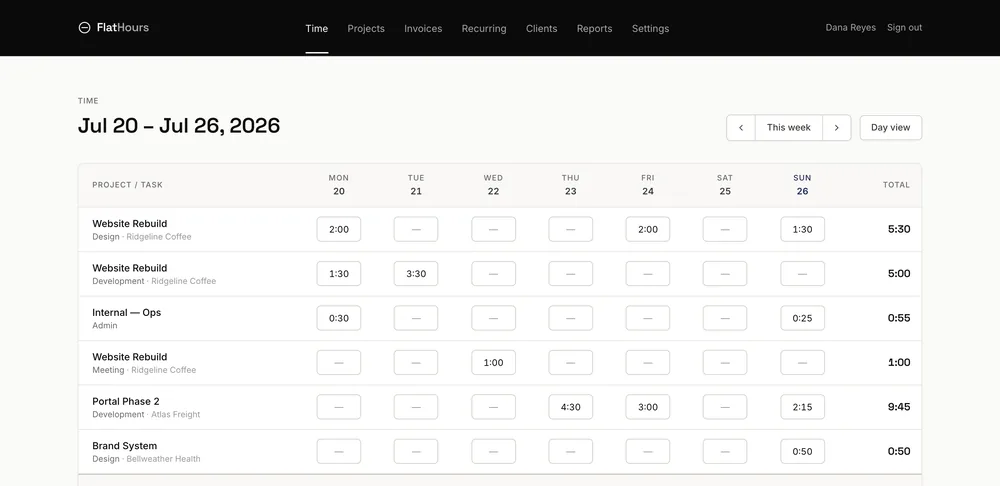
Timesheet
A week you can fill in on a Friday
Rows appear from the work you already tracked, so the sheet fills itself in as the week goes on. Type 1:30, 1.5, 90m or 1h30m — they all mean the same thing. Anything already invoiced locks itself read-only.
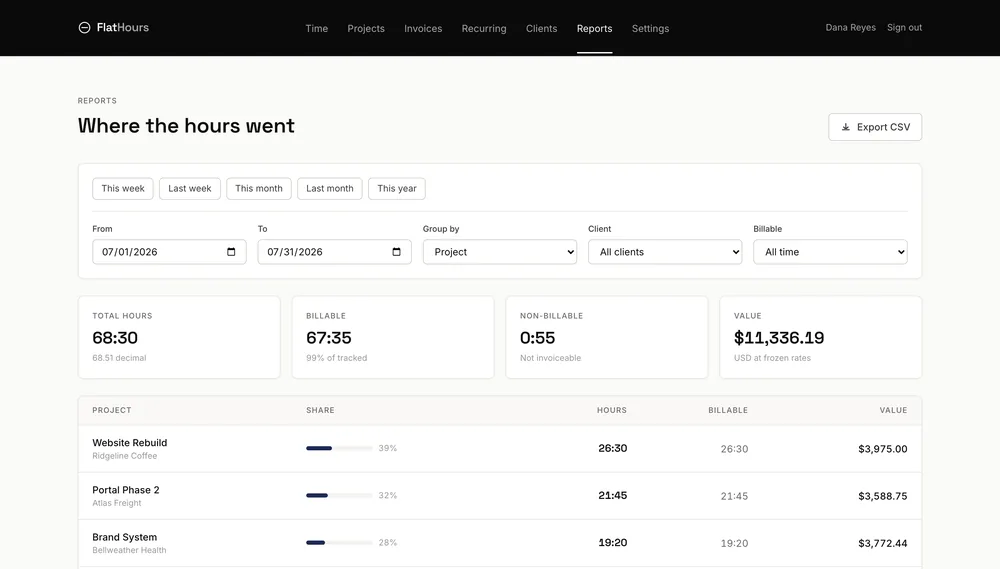
Reports
Where the hours actually went
Group by project, client, person or task over any range. Billable split, the value of the work at your real rates, and a CSV out when your accountant asks.
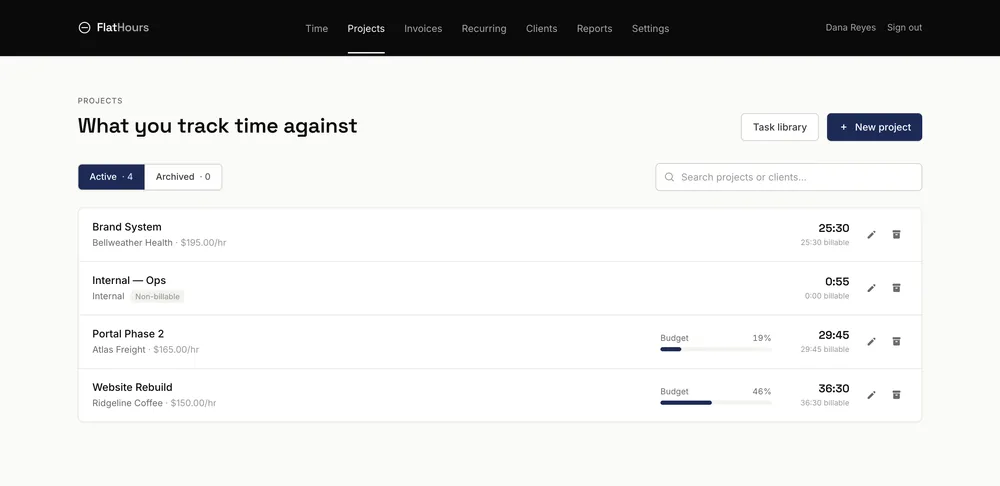
Projects and rates
Rates that hold still
Per project, per person or per task, with budgets that burn down as you work. The rate freezes onto each entry when you log it, so re-pricing a project next quarter never restates work you already did.
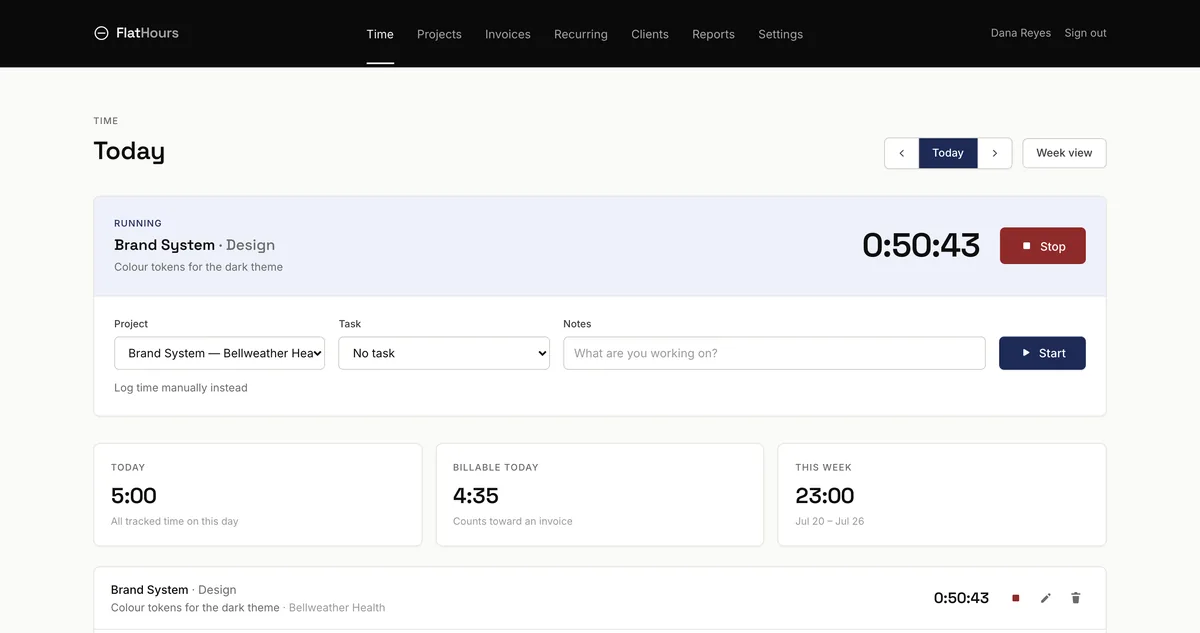
One timer, never two
Starting a second timer stops the first, and a double-click can never leave two clocks running against the same afternoon.
Hours become invoices
Pull uninvoiced time onto a draft, grouped the way you bill. Preview the lines first. Billed hours lock, so nothing is ever sold twice.
Clients pay you directly
Connect your own Stripe. Money settles to you on your own payout schedule and never passes through us.
Watch it add up
Money ticks up beside the running clock, in your client's currency, and the day tells you what it earned.
Expenses and approvals
Receipts, categories and disclosed markup. Optionally require time to be approved before it can reach an invoice.
Never leave the form
If the project, task or client is not in the list, type the name and it is created inline. No detour, no lost context.

Scope
What we deliberately left out
No resource planning, no capacity forecasting, no utilisation dashboards. No native desktop or mobile app yet, though there is an API. No SAML single sign-on against your own identity provider, which is a different thing from the Google, Microsoft and LinkedIn sign-in you do get. No payroll.
And nothing that watches you. No screen monitoring, no screenshots, no activity recording, on any plan, ever. That one is not a gap we are working on.
If your team depends on the planning features you want a PSA platform, and we would rather point you at one than have you leave in a month.
See how we compare, honestlyLeaving
You can take everything and go, today
One button in Settings hands you your whole account as CSV: clients, contacts, projects, tasks, every time entry, expenses, invoices, line items and payments, in a zip with a README that documents the format so another tool can read it. On every plan, including the free one, with no support ticket, no notice period and no conversation.
We are new, and we are not going to pretend a founding year at you. We cannot promise we will never be acquired, because the people who promised that to Harvest customers were not lying either, right up until it stopped being their promise to keep. So judge the exit instead of the pledge.
Nothing is metered
No charge per invoice, project, client or task, on any plan. No percentage of what you collect.
The price is written down
An existing paid subscription keeps its price for at least twelve months after any change. That is in the Terms, not a blog post.
Your data is not a feature
The export is not on a paid tier. Charging for the right to leave is the trap, not the product.
Pricing
One number. That is the whole bill.
Free
Everything one person needs to track and bill.
- Unlimited projects, clients and time tracking
- Unlimited invoices, sent as PDF
- Full import from Harvest, however big
- Timer, timesheet and reports
- One person
Solo
One person, everything switched on.
- Everything in Free
- Card and ACH payments through your own Stripe
- Recurring invoices
- Export to Xero, and the API
- Branded invoice PDFs
Team
One flat price. Hire as many people as you like.
- Everything in Solo
- Unlimited people at no extra cost
- Per-person and per-task rates
- Team reporting
- Roles and permissions
Annual billing charges ten months for twelve. Prices in USD. Cancel any time from your billing page.
What we never charge for
- Invoices sent
- Projects created
- Clients added
- Tasks used
- A percentage of payments you collect
Questions people actually ask
What changed with Harvest pricing in 2026?
Harvest replaced its legacy plans with Teams and Enterprise tiers and added usage-based billing on top of the per-seat fee. Accounts are now charged for invoices, projects, clients and tasks in addition to seats, and the per-unit rates are not published. Renewals default to Enterprise with Unlimited usage unless you act before your renewal date.
How much does FlatHours cost?
Free forever for one seat, with unlimited projects, clients, time tracking and invoices. Solo is $5 a month for one seat with everything switched on. Team is $29 a month flat, for any number of people. Annual billing charges ten months for twelve. There are no other charges.
Does FlatHours charge per invoice, project or client?
No. Only which plan you choose affects your bill, never how much you use it. Solo is one flat price for one seat, and Team is one flat price for as many people as you hire. We do not charge for invoices sent, projects created, clients added or tasks used, and we never take a percentage of the payments you collect.
Can I import my data from Harvest?
Yes. Create a personal access token in Harvest and FlatHours imports your clients, projects, tasks, per-project rates, budgets and full time-entry history. The import is safe to run more than once: it updates records it already imported rather than duplicating them. Time already invoiced in Harvest arrives locked so it cannot be billed twice.
How do I get paid through FlatHours?
You connect your own Stripe account. Your clients pay you directly and funds settle to you on your existing payout schedule. The money never passes through FlatHours, and we take 0% of it.
Is there a free plan?
Yes, and it does not expire. One seat, unlimited time tracking, projects, clients and invoices, plus a full import from Harvest. No card is required to start.
What is the best Harvest alternative for a small agency?
It depends what you need. If you want resource planning, forecasting and full PSA features, look at Productive or Kantata. If you only need a stopwatch, Toggl and Clockify are cheaper. FlatHours is for teams who need time tracking and invoicing together, done properly, at a price that does not move.
Can I cancel and export my data?
Yes. Cancel any time from the billing page, with no exit call and no retention offer. Time data exports to CSV from the reports screen and invoices download as PDFs.

Your renewal date is a deadline.
Moving takes about ten minutes.
Import your clients, projects and full time history from Harvest in one step, then carry on working. The free plan does not expire, so you can move before your renewal and decide about paying later.